
Table of contents
- 01What Is an AI Agent Application?
- 02Why AI Agent Development Matters in 2026
- 03Step 1: Select a High-Value Business Workflow
- 04Step 2: Define the Agent's Scope and Boundaries
- 05Step 3: Design the AI Agent Architecture
- 06Step 4: Single Agent or Multiple Agents
- 07Step 5: Connect Business Data Safely
- 08Step 6: Use MCP and APIs for Tool Integration
- 09Step 7: Build Security In from the Beginning
- 10Step 8: Create an Evaluation System
- 11Step 9: Choose a Scalable Technology Stack
- 12Step 10: Build the AI Agent in Phases
- 13What Determines AI Agent Development Cost?
- 14Common AI Agent Development Mistakes
- 15How to Choose an AI Agent Development Company
- 16Build an AI Agent That Solves a Real Problem
- 17Frequently Asked Questions
- 18References
AI applications are moving beyond simple chat interfaces.
In 2026, businesses increasingly want AI systems that can understand an objective, retrieve relevant information, use external tools, complete multi-step tasks, and return a useful result with limited manual supervision.
These systems are commonly called AI agents or agentic AI applications.
A customer-support agent might investigate an account, review previous conversations, search a knowledge base, create a support ticket, and prepare a personalized reply. A sales agent might qualify a lead, update a CRM, draft a proposal, and schedule the next action. An operations agent could monitor incoming data, identify exceptions, and trigger an approved workflow.
Building a production-ready AI agent, however, requires much more than connecting a chatbot to a language model.
You need a reliable application architecture, carefully controlled tools, secure data access, human approval rules, observability, evaluation, and a user experience that makes the system understandable and trustworthy.
This guide explains how to plan, design, build, test, and launch an AI agent application in 2026.
What Is an AI Agent Application?
An AI agent application is a software product that uses an AI model to reason about a goal, select appropriate actions, interact with tools or data, and complete one or more steps toward a defined outcome.
A normal chatbot mainly produces text.
An AI agent can produce text, but it may also:
- Search documents and databases
- Call business APIs
- Update customer records
- Create reports
- Send approved notifications
- Analyze uploaded files
- Run calculations
- Trigger automation workflows
- Collaborate with specialized agents
- Request human approval before sensitive actions
The most important difference is action.
A chatbot tells the user what could be done. An agent can help perform the work through controlled integrations.
A simple AI agent workflow
A typical agent follows this sequence:
- 1The user provides an objective.
- 2The application determines the user's intent.
- 3The agent creates or selects a plan.
- 4It retrieves the required context.
- 5It chooses an approved tool.
- 6The tool performs an action.
- 7The agent evaluates the result.
- 8It continues, asks for approval, or returns the final answer.
- 9The application records the complete execution trace.
The agent should not receive unlimited access to every system. Its permissions, tools, data, and actions must be restricted according to the use case.
Why AI Agent Development Matters in 2026
The technical ecosystem for building agents has matured significantly.
Modern agent platforms now include built-in search tools, file retrieval, computer interaction, structured tool calling, execution tracing, and software development kits for coordinating single-agent and multi-agent workflows. OpenAI, for example, positions its Responses API and Agents SDK as core building blocks for agentic applications.
At the integration layer, the Model Context Protocol provides a standardized way for AI applications to connect with tools and contextual data. Its 2026 specification introduced major changes focused on stateless infrastructure, scalability, extensions, authorization, long-running tasks, and production deployment.
Agent-to-agent communication is developing as well. Google has demonstrated cross-language multi-agent workflows in which independently developed agents collaborate through the Agent2Agent protocol.
These developments make it easier to build useful AI systems without creating every integration and orchestration component from the beginning.
The opportunity is not to add an AI chat window to every website. The opportunity is to identify an expensive, repetitive, or slow business process and redesign it as a reliable AI-assisted workflow — the same principle behind effective AI application development services.
Step 1: Select a High-Value Business Workflow
The best AI agent products begin with a specific operational problem.
Avoid starting with a broad objective such as:
“We need an AI agent for our business.”
Instead, define a measurable workflow:
“We need an agent that reviews new support requests, retrieves the relevant account and policy information, drafts a response, and sends it to a human reviewer.”
A useful first workflow usually has four characteristics.

It happens frequently
The task should occur often enough for automation to create meaningful value.
It follows recognizable patterns
Agents perform better when the workflow contains repeatable decisions, known inputs, and clearly defined outcomes.
It currently consumes time or money
Look for manual research, data entry, document processing, repetitive communication, reporting, or coordination work.
Its success can be measured
Useful measurements include:
- Time saved per task
- Cost per completed task
- Percentage of tasks completed correctly
- Human review time
- Customer response time
- Lead conversion rate
- Error rate
- User satisfaction
A narrow, valuable agent is more likely to succeed than a general-purpose agent with unclear responsibilities.
Step 2: Define the Agent's Scope and Boundaries
Before selecting a model or development framework, document what the agent is permitted to do.
Create four lists.
1. Actions the agent can perform independently
Examples:
- Search an approved knowledge base
- Summarize a document
- Categorize a support request
- Calculate a quotation
- Draft a response
- Create an internal report
2. Actions requiring human approval
Examples:
- Sending an external email
- Issuing a refund
- Publishing content
- Changing a customer's subscription
- Deleting information
- Approving a financial transaction
3. Actions the agent must never perform
Examples:
- Accessing unrelated customer records
- Revealing private system instructions
- Bypassing account permissions
- Executing unapproved code
- Sending payments without authorization
- Making unsupported legal or medical claims
4. Conditions that require escalation
Examples:
- Low confidence
- Missing information
- Conflicting records
- High-value transaction
- Policy exception
- Repeated tool failure
- Suspected security issue
These boundaries form the foundation of your permissions model, user experience, testing plan, and security controls.
Step 3: Design the AI Agent Architecture
A reliable AI agent application normally contains several connected layers.
AI AGENT APPLICATION ARCHITECTURE
- 1User ExperienceWeb app, dashboard, chat, forms and workflow screens
- 2Authentication & PermissionsWho the user is and what they may access
- 3Agent OrchestrationPlanning, tools, state, retries, approvals, handoffs
- 4AI ModelRouting between reasoning and fast, low-cost models
- 5Tools & IntegrationsCRM, APIs, email, billing, search, file processing
- 6Business DataRecords, documents, retrieval, memory and audit logs
- 7Observability & EvaluationTraces, cost, latency, quality and feedback
1. User experience layer
This is the web application, mobile application, dashboard, chat interface, form, or workflow screen used by the customer or employee.
A strong interface should show:
- What the agent is doing
- What information it is using
- Which actions require approval
- Whether a task is running, completed, or blocked
- What the user can change or cancel
- Where the final result came from
Users should not be forced to trust an invisible process.
2. Authentication and permissions layer
The application must verify the user and determine which data and actions that user is allowed to access.
Permissions should be enforced by the application and backend services — not merely described inside an AI prompt.
3. Agent orchestration layer
The orchestration layer manages the agent's workflow.
It may handle:
- System instructions
- Model selection
- Tool definitions
- Conversation state
- Planning
- Retries
- Timeouts
- Human approvals
- Multi-agent handoffs
- Error recovery
- Execution logs
This layer determines how the application behaves when the first model response is incomplete, incorrect, or unable to continue.
4. Model layer
Different tasks may require different models.
A high-capability reasoning model may be appropriate for complex planning. A faster and less expensive model may be better for classification, extraction, rewriting, or routine summaries.
Production systems should route work according to difficulty rather than sending every request to the most expensive model.
5. Tool and integration layer
Tools allow the agent to interact with external systems.
Common tools include:
- CRM search and updates
- Database queries
- Calendar operations
- Email drafting
- Document retrieval
- Payment or billing systems
- Customer-support platforms
- Inventory systems
- Analytics services
- Internal APIs
- Web search
- File processing
Every tool should have a narrow purpose, validated inputs, controlled outputs, and clearly defined permissions.
6. Data and memory layer
The application may need several kinds of memory:
- Current conversation context
- User preferences
- Business records
- Retrieved documents
- Temporary workflow state
- Long-term task history
- Audit logs
Do not place every available record into the model context. Retrieve only the information needed for the current task.
7. Observability and evaluation layer
A production agent must record what happened during execution.
Useful logs include:
- User request
- Model selected
- Tools called
- Tool inputs and outputs
- Approvals requested
- Errors and retries
- Token usage
- Processing time
- Final response
- User feedback
Tracing is especially important for multi-step applications because the final answer alone does not explain how the system reached its conclusion. This is also where admin dashboard development becomes part of the AI product rather than an afterthought.
Step 4: Decide Between a Single Agent and Multiple Agents
Many applications do not need a multi-agent system.
A single well-designed agent with several clearly defined tools is often easier to build, evaluate, secure, and maintain.
Use one agent when:
- The workflow has a single main objective
- The available tools are closely related
- The decision path is relatively simple
- One set of instructions can control the process
- You want to launch an MVP quickly
Consider multiple agents when the workflow contains genuinely separate areas of responsibility.
For example:
- A research agent gathers verified information.
- An analysis agent evaluates the information.
- A writing agent prepares the deliverable.
- A review agent checks the output against policy.
Multi-agent architecture may also be useful when different teams maintain different services, models, programming languages, or security boundaries.
However, more agents create more communication, latency, cost, failure points, and testing requirements. Do not use a multi-agent architecture simply because it sounds advanced.
Step 5: Connect Business Data Safely
An agent becomes useful when it can access accurate business context.
This may include:
- Product documentation
- Company policies
- Customer records
- Pricing data
- Previous support conversations
- Contracts
- Inventory information
- Project documentation
- Analytics
- Internal standard operating procedures
A common method is retrieval-augmented generation, or RAG.
Instead of expecting the model to know private business information, the application searches an approved data source and provides the most relevant content for the current request.
A strong retrieval workflow includes:
- 1Clean and well-structured source documents
- 2Useful document metadata
- 3Appropriate content chunking
- 4Search or vector retrieval
- 5Permission-aware filtering
- 6Relevance ranking
- 7Source references
- 8Procedures for updating outdated information
The quality of an AI application often depends more on its data pipeline than on its prompt.
When the data is incomplete, duplicated, outdated, or poorly organized, the agent may produce confident but unreliable results.
Step 6: Use MCP and APIs for Tool Integration
Traditional APIs remain essential for production AI applications.

The agent should interact with your backend through secure, deterministic functions that validate every request.
The Model Context Protocol can complement APIs by providing a standardized method for exposing tools, prompts, and contextual resources to compatible AI applications.
MCP uses a client-server architecture in which an AI host connects to one or more MCP servers that provide tools or context. It focuses on context exchange rather than dictating which model or application architecture must be used. In practice, MCP can help teams create reusable connections to:
- Internal databases
- Development tools
- Document systems
- Analytics platforms
- Customer-support services
- Project-management platforms
- Business applications
For a production deployment, evaluate authentication, authorization, data exposure, version compatibility, rate limits, failure handling, and observability before connecting an MCP server.
Step 7: Build Security Into the Agent from the Beginning
Security cannot be added after the AI application is complete.
Agentic systems introduce risks beyond traditional web application security because models interpret untrusted natural-language content and may use tools with real permissions.
OWASP guidance highlights risks such as prompt injection, model misuse, privilege escalation, data poisoning, hallucinations, and unpredictable agent behavior. Core security controls include:
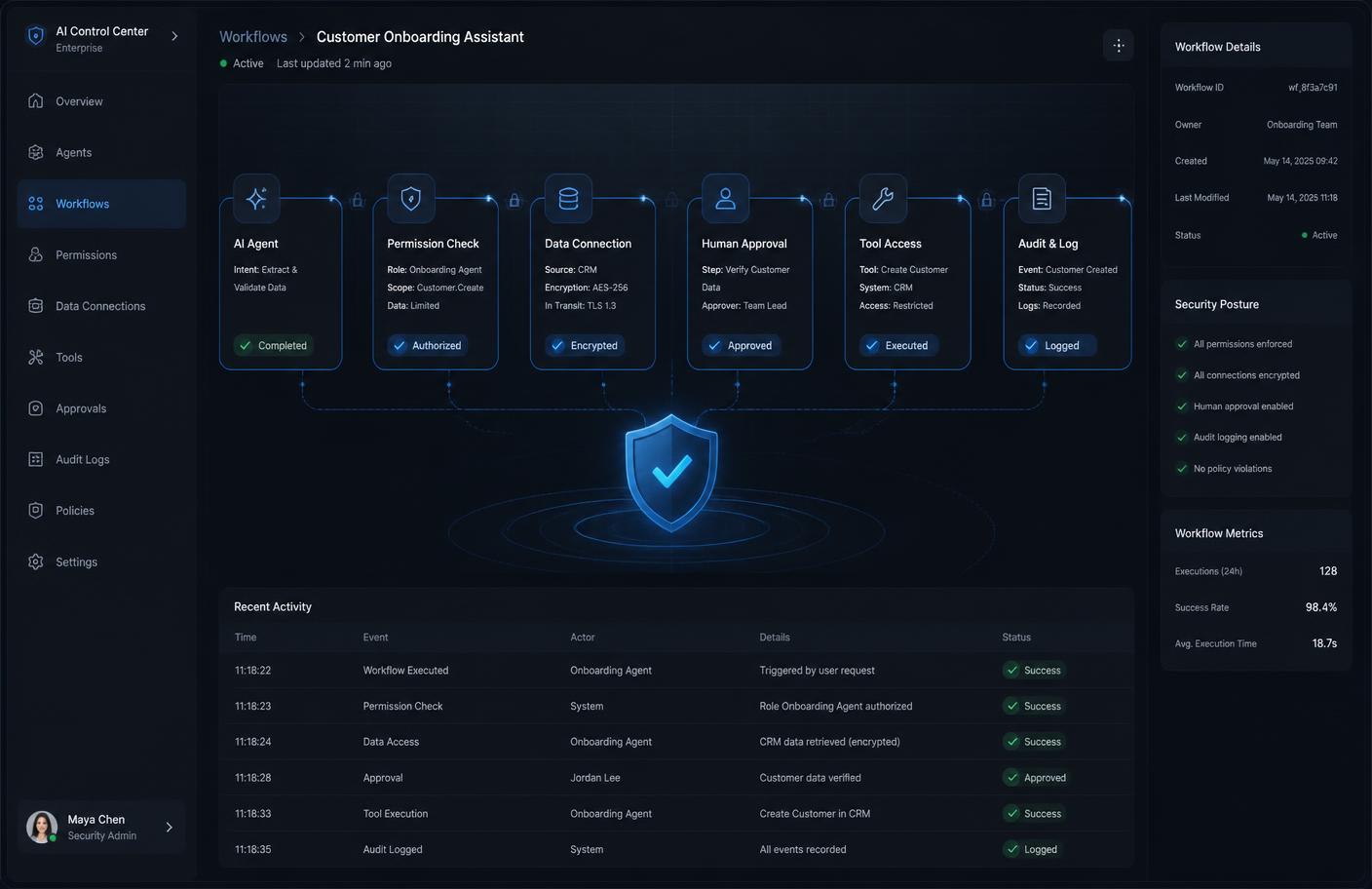
Least-privilege access
Give each agent and tool only the minimum permissions required for the task.
Server-side authorization
Check user and agent permissions on the server before performing an action.
Input validation
Validate every tool parameter using strict schemas and business rules.
Output validation
Do not assume a model-generated value is safe simply because it follows the expected format.
Human approval
Require confirmation before financial, destructive, external, or high-impact actions.
Data separation
Prevent one customer, workspace, or organization from accessing another customer's information.
Secret protection
Never place API keys, passwords, or private credentials inside prompts or client-side code.
Tool allowlists
Expose only approved tools. Avoid giving an agent open-ended access to operating systems, databases, or networks.
Prompt-injection resistance
Treat retrieved documents, websites, emails, and user-uploaded files as potentially untrusted.
Audit trails
Record sensitive actions and preserve enough information to investigate errors or abuse.
Security decisions should be enforced through application logic. A sentence such as “never reveal private data” inside a prompt is not a complete security control.
Step 8: Create an Evaluation System
A demo can appear impressive while still failing in real business situations.

Before launch, create a test dataset representing the requests the agent will receive.
Include:
- Normal requests
- Ambiguous instructions
- Missing information
- Incorrect information
- Long documents
- Conflicting documents
- Unsupported requests
- Permission violations
- Prompt-injection attempts
- Tool failures
- Unexpected output formats
- Requests requiring human escalation
Evaluate more than the final wording
Track whether the agent:
- Selected the correct tool
- Used the correct information
- Followed user permissions
- Requested approval when required
- Avoided unsupported claims
- Completed the workflow
- Recovered from errors
- Returned the expected format
- Stayed within acceptable cost and latency limits
For high-impact workflows, combine automated evaluation with expert human review.
Evaluation should continue after launch. Real users will submit requests that were not included in the original test set.
Step 9: Choose a Scalable Technology Stack
The best stack depends on the product, team, integrations, and expected traffic.

A modern AI web application might use:
Frontend
- Next.js
- React
- TypeScript
- Tailwind CSS
- A responsive component system
Backend
- Node.js
- Next.js server functions
- Python services for specialized AI workflows
- Secure REST or event-driven APIs
Data
- PostgreSQL
- Supabase
- Vector search
- Object storage
- Redis or a similar caching and queue system
AI and orchestration
- A supported model API
- Structured tool calling
- Agent SDK or custom orchestration
- MCP clients and servers where appropriate
- Evaluation and tracing tools
Infrastructure
- Vercel
- AWS
- Docker
- Background workers
- Monitoring and alerting services
The stack should support security, observability, background tasks, streaming responses, reliable retries, and future scaling.
Choosing familiar, maintainable technology is usually better than assembling an unnecessarily complex collection of new frameworks. The same stack supports custom AI web applications, AI SaaS development and mobile application development.
Step 10: Build the AI Agent in Phases
A phased development process reduces risk.
- 1
Phase 1: Discovery
Define target users, the business problem, the current workflow, required integrations, success metrics, security requirements, approval rules, and expected usage.
- 2
Phase 2: Workflow prototype
Build a controlled prototype using sample data. The purpose is to test whether the AI can complete the core reasoning and tool-selection tasks — not to create the final user interface.
- 3
Phase 3: User experience design
Design the main screens, approval states, error messages, task history, and result presentation. The UI should make agent activity understandable.
- 4
Phase 4: MVP development
Build the smallest production-capable version containing authentication, the core agent workflow, essential integrations, data retrieval, approval controls, logging, basic evaluation, and a responsive UI.
- 5
Phase 5: Security and reliability testing
Test permissions, prompt injection, tool errors, concurrency, rate limits, invalid data, and recovery behavior.
- 6
Phase 6: Controlled launch
Release the application to a small group of real users. Monitor successful completion rate, human correction rate, cost per workflow, average processing time, common failure reasons, and user satisfaction.
- 7
Phase 7: Optimization and scaling
Improve the prompts, tools, retrieval, model routing, interface, infrastructure, and evaluation dataset based on real usage.
What Determines AI Agent Development Cost?
AI agent development cost depends on the complete system rather than the chat interface alone.
The main cost drivers are:
- Number and complexity of workflows
- Number of third-party integrations
- Quality and structure of existing data
- Authentication and permission requirements
- Custom dashboard or mobile application needs
- Real-time or background processing
- Human approval workflows
- Multi-agent orchestration
- Security and compliance requirements
- Evaluation and testing depth
- Expected usage volume
- Ongoing monitoring and support
A focused internal assistant using one knowledge base is considerably simpler than a multi-tenant AI SaaS platform that connects to billing, CRM, email, analytics, and external customer accounts.
The best way to control cost is to launch one high-value workflow first and expand only after the application demonstrates measurable value.
Common AI Agent Development Mistakes
Building a general agent without a defined outcome
A broad assistant may produce interesting responses without solving a valuable problem.
Giving the agent too many tools
More tools make selection, security, and testing harder. Start with the smallest useful toolset.
Using prompts as security controls
Prompts can influence model behavior, but permissions must be enforced in code.
Automating sensitive actions too early
Begin with recommendations and drafts. Add autonomous actions after the workflow proves reliable.
Ignoring failure states
Every API, model, database, and integration can fail. Design retries, timeouts, fallbacks, and escalation paths.
Building multi-agent systems unnecessarily
Multiple agents increase complexity. Use them only when separate responsibilities provide a clear benefit.
Launching without evaluation
Manual testing with a few ideal prompts does not represent production usage.
Hiding the agent's actions
Users need progress indicators, approvals, sources, and understandable error messages.
Sending every task to one model
Model routing can improve speed and cost while reserving advanced reasoning for the tasks that need it.
How to Choose an AI Agent Development Company
The right development partner should understand both AI systems and conventional software engineering.
Ask potential developers how they will handle:
- Product discovery
- Workflow design
- User permissions
- Data architecture
- Tool integrations
- Model selection
- Retrieval quality
- Human approvals
- Prompt injection
- Automated evaluations
- Monitoring
- Deployment
- Ongoing optimization
Review whether they have experience building complete digital products rather than isolated AI demonstrations — you can view completed projects to judge that quickly.
A production AI agent requires frontend development, backend architecture, databases, APIs, security, user experience design, testing, deployment, and business understanding.
Build an AI Agent That Solves a Real Business Problem
Successful AI agent applications are not defined by how autonomous they appear.
They are defined by whether they complete useful work safely, consistently, and measurably.
Start with one valuable process. Give the agent controlled access to the required tools and data. Build clear approval rules. Test realistic scenarios. Monitor every important action. Expand the application only when the first workflow is reliable.
At AI Application Developer, I build end-to-end AI web applications, mobile applications, SaaS platforms, business automation development, dashboards, and integrated AI systems.
From initial product discovery and UI/UX design to development, testing, deployment, and optimization, each system is designed around real business outcomes.
Planning an AI agent, AI SaaS platform, or intelligent business automation? Start your project with a clear technical roadmap and a scalable product foundation.
Ready to Build a Production-Ready AI Agent?
Turn your AI product idea into a secure, scalable web application, SaaS platform, mobile app, or business automation.
Frequently Asked Questions
What is AI agent app development?
AI agent app development is the process of building software that uses AI models to understand objectives, retrieve information, call approved tools, complete multi-step workflows, and return useful results. It combines AI engineering with frontend development, backend systems, APIs, databases, security, and user experience design.
What is the difference between an AI agent and a chatbot?
A chatbot primarily communicates through text. An AI agent can communicate but may also retrieve business data, call APIs, update systems, create files, perform calculations, and complete approved actions.
Does every AI application need multiple agents?
No. Many applications work better with one carefully designed agent and a small set of tools. Multiple agents are useful when the workflow contains separate responsibilities, systems, teams, or security boundaries.
Can an AI agent connect to my existing business software?
Yes. An AI agent can connect to CRMs, databases, support platforms, calendars, document systems, billing tools, analytics services, and internal software through secure APIs or supported protocol integrations.
What is MCP in AI agent development?
The Model Context Protocol is a standardized protocol that enables compatible AI applications to connect with tools and contextual data. It can make integrations more reusable, although authentication, authorization, security, and application-level controls are still required.
How long does it take to develop an AI agent application?
The timeline depends on workflow complexity, integrations, data readiness, security requirements, and the level of UI development. A focused prototype can be developed more quickly than a production SaaS platform with multiple integrations and user roles.
How do you make an AI agent secure?
Secure AI agents use least-privilege access, server-side authorization, validated tool inputs, controlled data retrieval, human approval for sensitive actions, audit logs, prompt-injection defenses, testing, and continuous monitoring.
Can an AI agent be added to an existing website or application?
Yes. An AI agent can be integrated into an existing website, SaaS platform, dashboard, mobile application, or internal business system when the current architecture provides secure access to the required data and workflows.

Hanif Ullah
AI Application Developer
6+ years of development experience building AI web applications, mobile apps, SaaS products, business automations, admin dashboards and complete digital products — from discovery and design through development, deployment and optimization.
View profile