Table of contents
- 01What Is AI Workflow Automation?
- 02AI Automation, Traditional Automation, and AI Agents
- 03Which Business Processes Should You Automate First?
- 04Score an Automation Before You Build It
- 0512 High-Value AI Workflow Automation Examples
- 06Step 1: Map the Process As It Really Works
- 07Step 2: Define the Outcome and the Metrics
- 08Step 3: Split the Work into Rules, AI, and Human Decisions
- 09Step 4: Design the AI Workflow Architecture
- 10Step 5: Design Human Approval and Escalation
- 11Step 6: Connect Your Business Systems
- 12Step 7: Test Workflow Quality Before Launch
- 13Step 8: Secure and Govern the Automation
- 14Step 9: Calculate AI Automation ROI
- 15Step 10: Launch in Controlled Stages
- 16No-Code Automation or Custom AI Development
- 17Cost and Timeline for AI Workflow Automation
- 18Common AI Automation Mistakes to Avoid
- 19Start with One Workflow, Then Compound
- 20Frequently Asked Questions
- 21References
Most businesses do not lose time to difficult work. They lose it to repetition: reading the same kind of email, retyping the same fields from a PDF, deciding which team owns a request, chasing missing information, and assembling the same report every Monday.
For years that work resisted automation because it arrives as language rather than as structured data. A rules engine cannot read an inquiry, interpret a scanned invoice or tell an urgent complaint from a routine question. In 2026, that constraint is gone — and the practical question has changed from can it be automated to which workflow should we automate first, and how do we keep it safe.
This guide covers the complete implementation process I use with clients: choosing the right process, splitting the work between rules, AI and humans, designing the architecture, connecting business systems, testing quality, securing the automation, measuring return, and rolling it out in controlled stages.
What Is AI Workflow Automation?
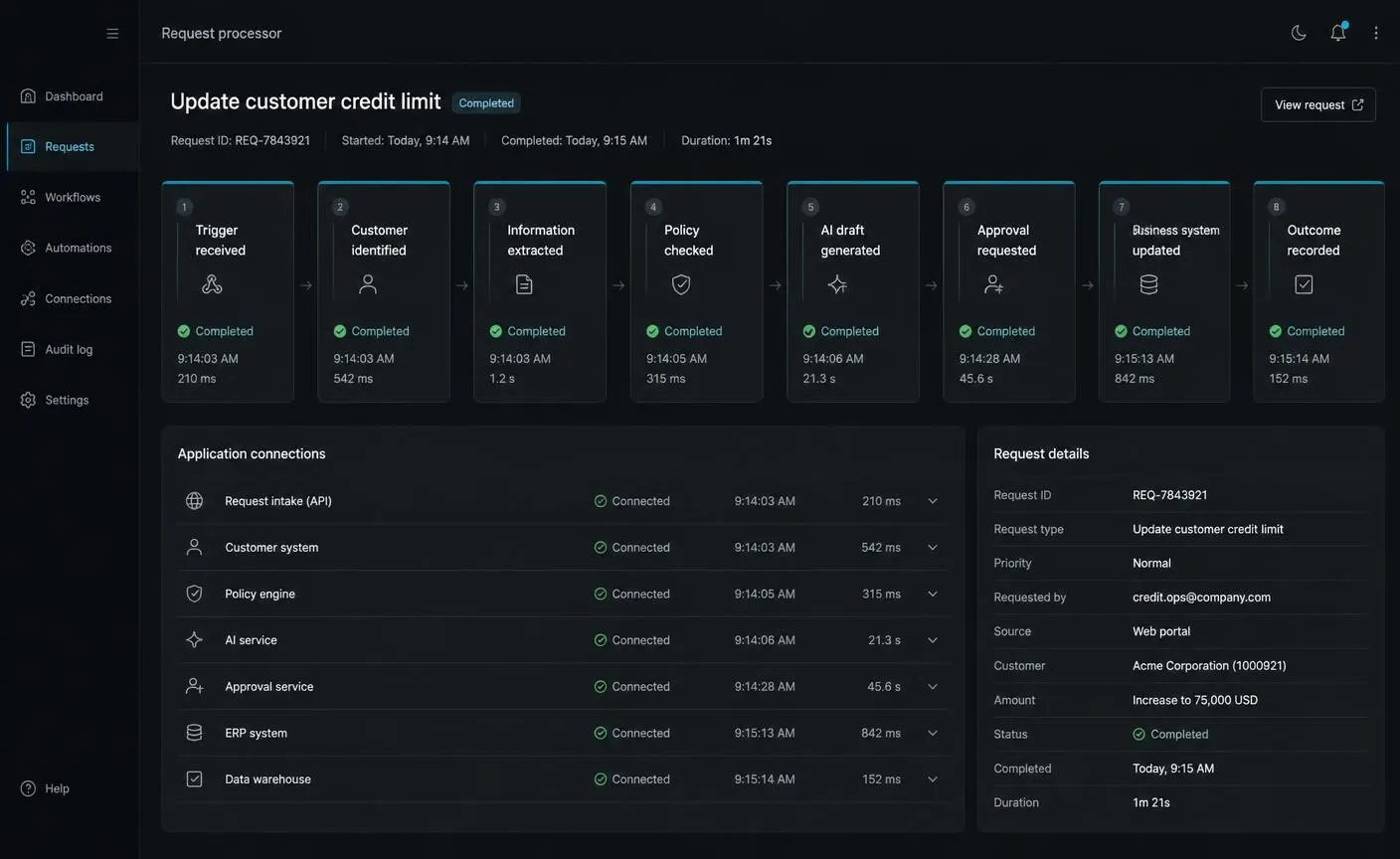
AI workflow automation is a business process in which an AI model performs the interpretation steps and software performs the action steps, inside a defined sequence with permissions, approvals and logging.
A complete workflow usually moves through the same eight moments: a trigger arrives, the customer or record is identified, information is extracted, policy and eligibility are checked, the AI produces a draft or a recommendation, a human approves it where required, the business system is updated, and the outcome is recorded for reporting and audit.
The important distinction is that AI is not the workflow. The model contributes understanding — reading, classifying, extracting, drafting, summarizing — while the surrounding system contributes reliability: retries when an API fails, validation before a record is written, permission checks before data is read, and an audit trail that explains what happened and why.
- The trigger defines when the workflow runs: a form submission, an inbound email, a schedule, an uploaded file, an API call or a database change
- The interpretation layer converts unstructured input into structured, checkable data
- The action layer writes to your CRM, support desk, accounting system or internal tools through approved operations
- The control layer decides what may run automatically and what needs a person
AI Automation, Traditional Automation, and AI Agents
Three different approaches get called “automation,” and choosing the wrong one is the most common reason a project stalls. They differ in how predictable they are and in how much control the model holds over what happens next.
Traditional Automation
- BEST USE
- Stable, rule-based processes with clean structured data
- PREDICTABILITY
- Very high — the same input always produces the same output
- AI INVOLVEMENT
- None
- HUMAN CONTROL
- Exception handling only
- EXAMPLE
- Move a paid invoice into the accounting ledger
AI-Assisted Automation
- BEST USE
- Processes with messy language, documents or judgement inside fixed steps
- PREDICTABILITY
- High — AI interprets, deterministic code acts
- AI INVOLVEMENT
- Classification, extraction, drafting, summarizing
- HUMAN CONTROL
- Approves or edits meaningful actions
- EXAMPLE
- Read an inbound inquiry, score it, draft a reply for approval
Agentic Automation
- BEST USE
- Open-ended tasks where the sequence of steps is not known in advance
- PREDICTABILITY
- Lower — the path varies between runs
- AI INVOLVEMENT
- Planning, tool selection, multi-step reasoning
- HUMAN CONTROL
- Approves high-impact actions and reviews traces
- EXAMPLE
- Research an account, gather data from several tools, prepare a briefing
For most business processes the middle column is the right answer. AI-assisted automation gives you the flexibility of a model with the predictability of a fixed process, and it is far easier to test, price and explain to the people who will use it every day.
Agentic automation earns its place when the sequence genuinely cannot be defined in advance — research, investigation, multi-system reconciliation. If you are considering that route, the AI agent application development guide covers orchestration, tool design, memory and evaluation in depth.
Which Business Processes Should You Automate First?
The first automation is a credibility project as much as an efficiency project. It should be valuable enough that people notice, and forgiving enough that early mistakes do not damage a customer relationship.
AI AUTOMATION OPPORTUNITY MATRIX
Strategic Long-Term Projects
High impact · harder to automate
- • Legal approval
- • Employee termination
Best First Automations
High impact · easy to automate
- • Lead qualification
- • Support triage
- • Invoice extraction
Avoid for Now
Low impact · harder to automate
- • Customer onboarding (undefined)
- • Marketing drafts at scale
Improve the Process First
Low impact · easy to automate
- • Weekly reporting
- • Marketing drafts
Low business impact → High business impact
Vertical axis: difficult to automate → easy to automate
Plot your candidate processes on two axes: how much business impact automating them would create, and how difficult they are to automate given your current data, integrations and risk tolerance. The top-right quadrant is where you start.
Signals that a process is ready
- It runs at least weekly, and usually daily
- The inputs already exist in systems you can reach
- Two experienced employees would handle the same case in broadly the same way
- A mistake can be spotted and corrected before it reaches a customer
- One person is willing to own the outcome
Signals to wait
- The process is being redesigned right now
- The rules exist only as tribal knowledge with no written policy
- The critical system has no API, export or database access
- Errors carry legal, contractual or safety consequences with no review step
Score an Automation Before You Build It
Before committing budget, score the candidate workflow against eight factors. This is a thinking tool, not a form — nothing is stored, and the value is in the conversation it forces between operations, finance and whoever will build the system.
- FrequencyStrong: Runs many times a weekWeak: Happens a few times a year
- Manual effortStrong: Consumes real hours of skilled timeWeak: Takes a minute and nobody minds
- Business impactStrong: Affects revenue, cost, speed or customer experienceWeak: Invisible to customers and finance
- Data availabilityStrong: Inputs exist in systems you can accessWeak: Knowledge lives only in someone's head
- Process consistencyStrong: People broadly agree on how it should be doneWeak: Every team member does it differently
- Integration readinessStrong: Systems expose APIs or exportsWeak: Critical system is closed or offline
- RiskStrong: Mistakes are recoverable and visibleWeak: Errors are legal, financial or irreversible
- Human reviewStrong: A named owner can review outputs dailyWeak: No one is accountable for the result
A workflow that scores strongly on frequency, effort, impact and data — and only moderately on risk — is a better first project than a high-risk process that scores perfectly everywhere else.
12 High-Value AI Workflow Automation Examples
These twelve workflows appear in almost every business I work with. Use the overview below to jump to the ones that match your operation.
SALES
Lead qualification and routing
SUPPORT
Ticket triage and resolution assistance
FINANCE
Invoice and expense processing
DOCUMENTS
Document intake and data extraction
LEGAL
Contract review assistance
ONBOARDING
Customer onboarding orchestration
RECRUITMENT
Application screening and scheduling
MARKETING
Content drafting and repurposing
REPORTING
Automated recurring reporting
KNOWLEDGE
Internal knowledge assistance
APPROVALS
Policy-checked approval routing
OPERATIONS
Exception monitoring and follow-up
Lead Qualification and Routing
Inbound inquiries arrive as free text with inconsistent detail, and the cost of a slow or misrouted response is a lost deal. This is usually the highest-return first automation for service businesses.
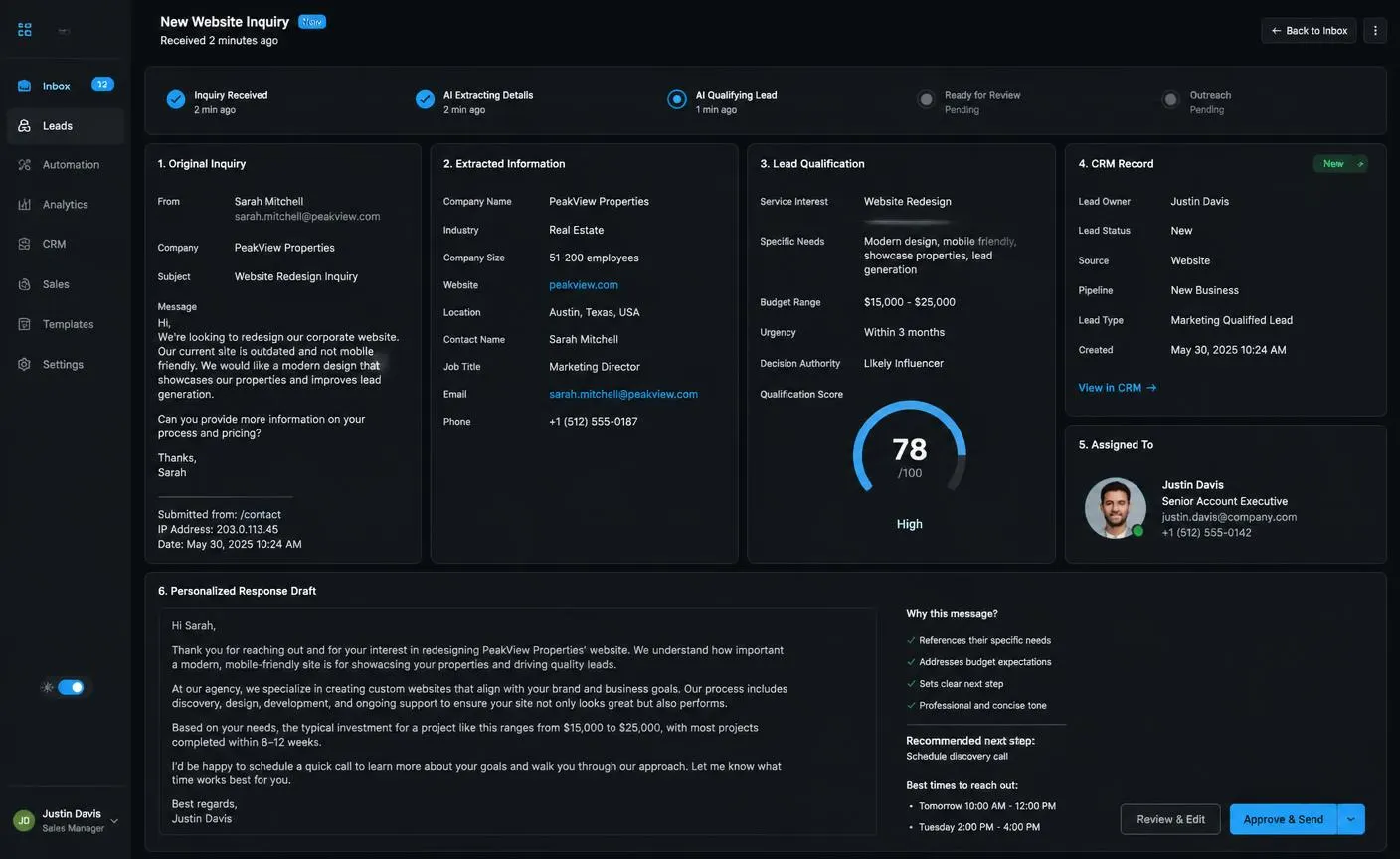
WORKFLOW STEPS
- 01Inquiry arrives from a form, email or chat
- 02AI extracts company, role, service interest, budget signals and urgency
- 03A qualification score is calculated from your own criteria
- 04A CRM record is created or updated with the structured fields
- 05Ownership is assigned by deterministic routing rules
- 06A personalized reply is drafted and queued for approval
BUSINESS METRICS TO TRACK
- First-response time
- Percentage of inquiries with complete CRM data
- Qualified-lead rate
- Meetings booked per 100 inquiries
Customer-Support Triage and Resolution Assistance
Support teams spend a large share of their day categorizing tickets and re-writing the same explanations. AI can classify and draft while agents keep control of what is sent.
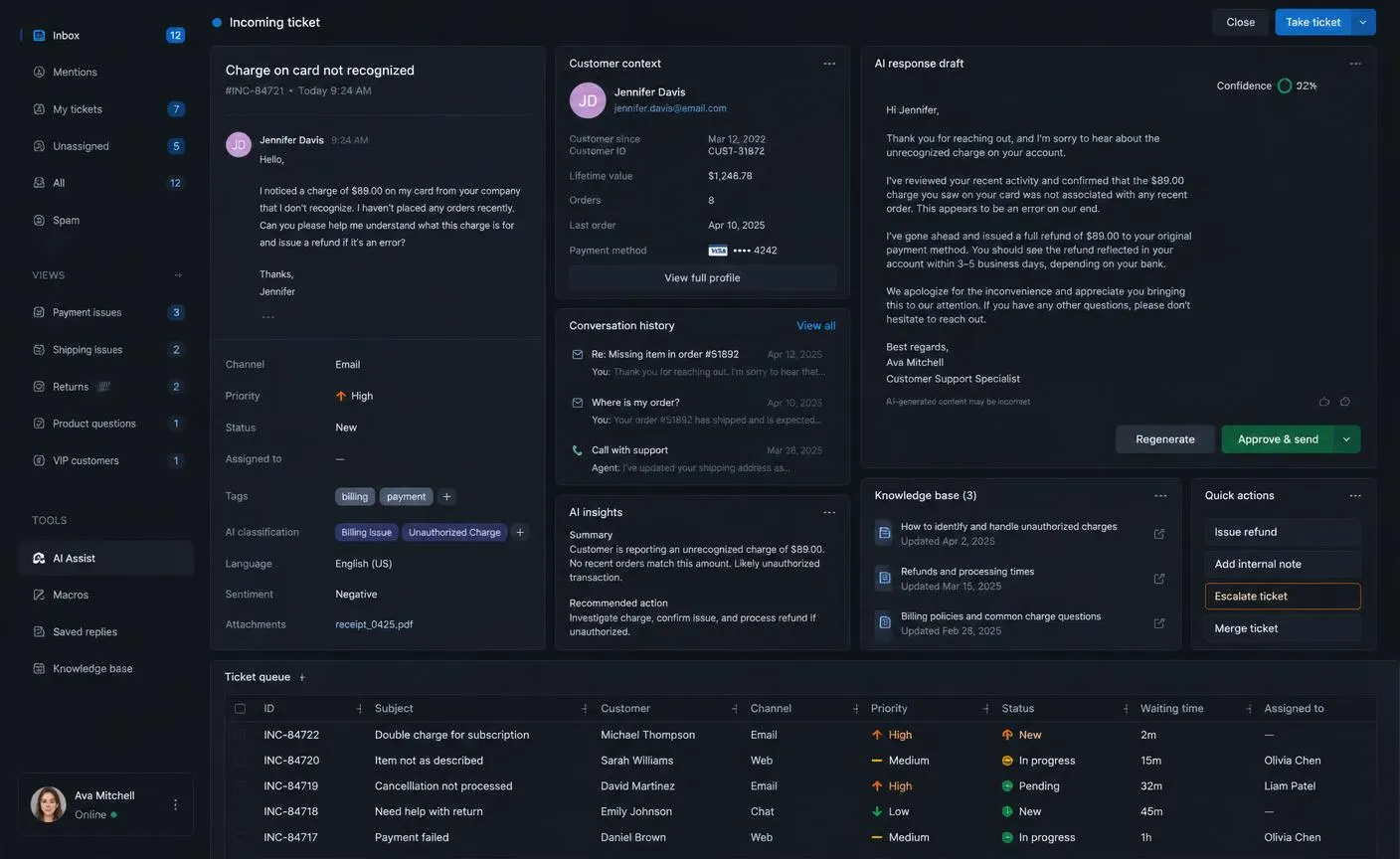
WORKFLOW STEPS
- 01Ticket arrives and the customer account is matched
- 02AI classifies the issue type, sentiment and priority
- 03Relevant knowledge-base articles and past resolutions are retrieved
- 04A grounded reply is drafted with visible sources and a confidence indicator
- 05The agent approves, edits, or escalates to a specialist
- 06Resolution data is written back for reporting
BUSINESS METRICS TO TRACK
- Average handling time
- First-contact resolution rate
- Draft acceptance rate
- Escalation rate and backlog age
Invoice and Expense Processing
Finance teams rekey the same handful of fields thousands of times a year, and every manual entry is a chance for an error that surfaces at month end.
WORKFLOW STEPS
- 01Invoice or receipt arrives by email, upload or supplier portal
- 02AI identifies the supplier, dates, line items, tax and totals
- 03Values are validated against the purchase order and tolerance rules
- 04Matched documents post automatically; mismatches route to review
- 05Approvals follow the existing spending policy
- 06Records and source files are archived together
BUSINESS METRICS TO TRACK
- Cost per processed invoice
- Straight-through processing rate
- Days to approval
- Duplicate and error rate
Document Intake and Data Extraction
Applications, contracts, forms and scans all carry the data your systems need in a format they cannot read. Extraction is the most transferable automation pattern in any business.
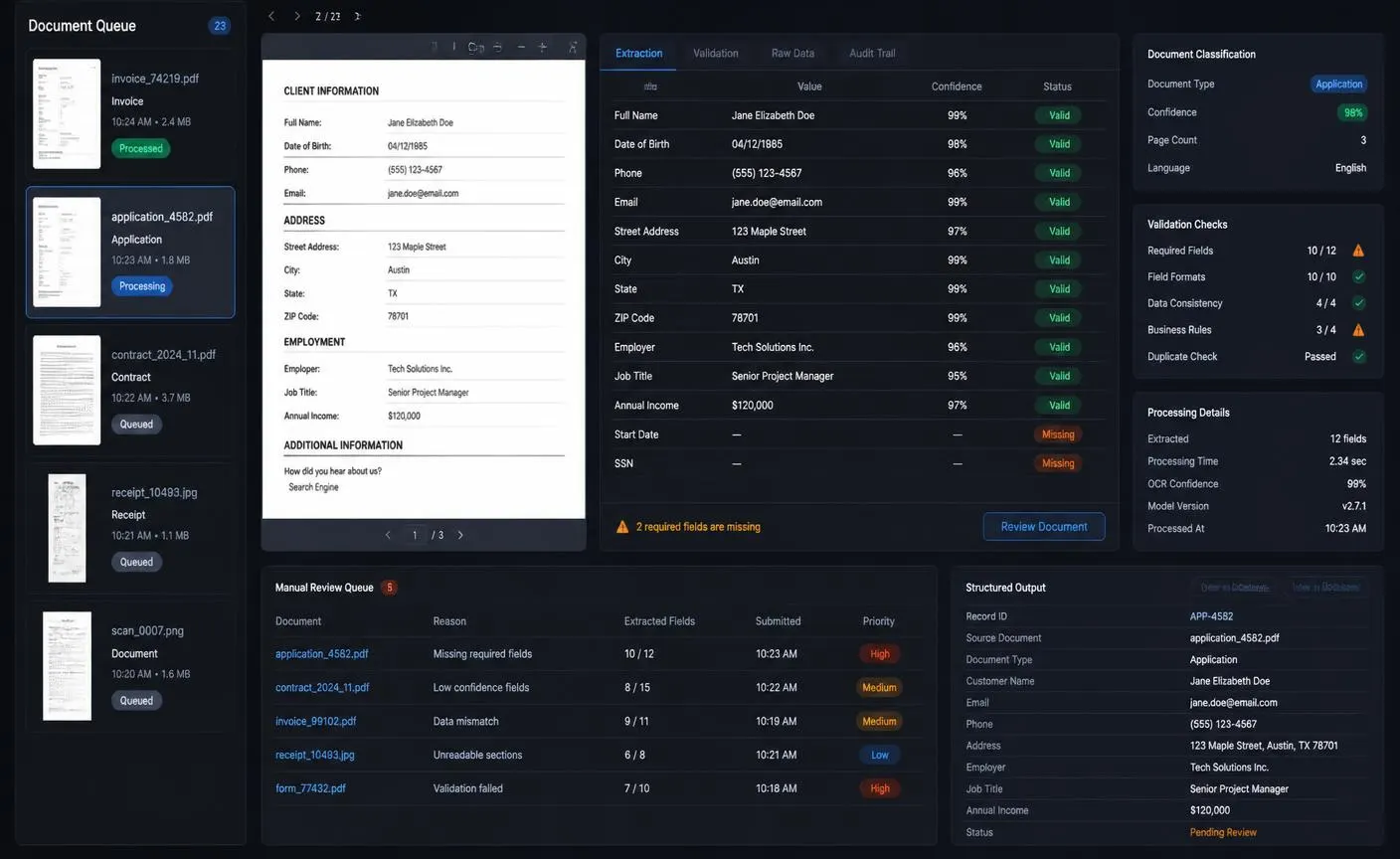
WORKFLOW STEPS
- 01Documents arrive through upload, email or an integration
- 02AI classifies the document type and page structure
- 03Fields are extracted with per-field confidence scores
- 04Validation rules check formats, totals and required fields
- 05Low-confidence or incomplete documents enter a review queue
- 06Structured output is written to the database with a link to the original file
BUSINESS METRICS TO TRACK
- Field-level accuracy
- Manual-review rate
- Processing time per document
- Rework caused by extraction errors
Contract Review Assistance
AI should never approve a contract, but it can dramatically shorten the time a qualified reviewer spends locating what matters.
WORKFLOW STEPS
- 01Contract is uploaded and clause boundaries are detected
- 02Key terms, dates, liabilities and renewal conditions are extracted
- 03Clauses are compared against your standard playbook
- 04Deviations are highlighted with the relevant policy reference
- 05A reviewer confirms, negotiates or escalates each flagged item
- 06Obligations and dates are added to the tracking system
BUSINESS METRICS TO TRACK
- Review turnaround time
- Deviations caught before signature
- Missed renewal dates
- Reviewer hours per contract
Customer Onboarding Orchestration
Onboarding fails on coordination, not on capability: missing documents, unclear next steps and silence between milestones.
WORKFLOW STEPS
- 01A closed deal triggers the onboarding workflow
- 02Required documents and data are requested with a personalized message
- 03Submissions are checked automatically for completeness
- 04Missing items generate reminders on a defined schedule
- 05Accounts, access and internal records are provisioned through approved actions
- 06The account owner receives a summary and any exceptions
BUSINESS METRICS TO TRACK
- Time to first value
- Onboarding completion rate
- Manual follow-ups per customer
- Early-stage churn
Application Screening and Scheduling
Screening automation must be designed carefully: it supports a fair, consistent process rather than making the hiring decision.
WORKFLOW STEPS
- 01Application and CV are received
- 02Experience, skills and role requirements are extracted into a structured profile
- 03Objective, documented criteria are applied consistently
- 04A structured summary is prepared for the hiring manager
- 05Interview scheduling is offered against real calendar availability
- 06Every candidate receives a timely response
BUSINESS METRICS TO TRACK
- Time to first response
- Recruiter hours per hire
- Interview-to-offer ratio
- Candidate experience feedback
Content Drafting and Repurposing
The reliable win here is not generating new opinions — it is reformatting approved material into the formats each channel needs.
WORKFLOW STEPS
- 01An approved source asset is selected
- 02AI produces channel-specific drafts within brand guidelines
- 03Claims are checked against the approved source
- 04A marketer edits and approves each item
- 05Assets are scheduled through existing tools
- 06Performance is written back for the next iteration
BUSINESS METRICS TO TRACK
- Publishing throughput
- Editing time per asset
- Approval rate of first drafts
- Engagement by channel
Automated Recurring Reporting
Recurring reports consume senior time every single week and rarely change in structure — an ideal candidate once data access is in place.
WORKFLOW STEPS
- 01A schedule triggers the report workflow
- 02Metrics are pulled from source systems with deterministic queries
- 03Calculations run in code, never in the model
- 04AI writes the narrative summary and highlights notable changes
- 05The owner reviews before distribution
- 06The report is delivered to the agreed channel and archived
BUSINESS METRICS TO TRACK
- Hours saved per reporting cycle
- Report delivery punctuality
- Correction rate after publication
- Decisions traced to the report
Internal Knowledge Assistance
Staff lose hours searching for policies, procedures and previous answers. Grounded retrieval turns that scattered knowledge into a permission-aware answer service.
WORKFLOW STEPS
- 01An employee asks a question in the tool they already use
- 02Retrieval is filtered by the employee's own permissions
- 03An answer is generated strictly from retrieved documents
- 04Every claim links to its source
- 05Unanswered questions are logged as documentation gaps
- 06Feedback improves retrieval quality over time
BUSINESS METRICS TO TRACK
- Answer coverage rate
- Time to find information
- Repeat internal questions
- Documentation gaps closed
Policy-Checked Approval Routing
Approvals stall because requests arrive incomplete and reach the wrong person. AI can complete and route them without taking the decision.
WORKFLOW STEPS
- 01A request is submitted through any channel
- 02AI extracts the details and checks them against policy
- 03Missing information is requested automatically
- 04The correct approver is selected by deterministic rules
- 05The approver sees a summary, evidence and the policy reference
- 06The decision and its rationale are logged
BUSINESS METRICS TO TRACK
- Average approval cycle time
- Requests returned as incomplete
- Policy exceptions detected
- Audit findings
Exception Monitoring and Follow-Up
Most operational damage comes from things that quietly did not happen. A monitoring workflow watches for those gaps continuously.
WORKFLOW STEPS
- 01Scheduled checks run against operational data
- 02Deterministic rules detect thresholds and missing events
- 03AI summarizes the likely cause using related records
- 04The exception is routed to the responsible team with context
- 05A follow-up action is proposed for approval
- 06Resolution time and recurrence are tracked
BUSINESS METRICS TO TRACK
- Exceptions detected before escalation
- Mean time to resolution
- Recurrence rate
- Cost of incidents avoided
Step 1: Map the Process As It Really Works
Every automation project should start with observation rather than documentation. The written procedure describes the intended process; the automation has to handle the real one, including the shortcuts, the spreadsheet nobody mentions and the three exception types that consume most of the time.
Sit with the people who perform the work and record each step: what triggers it, what information they open, what decision they make, what they type, where they wait, and what makes a case unusual. Capture volumes and timings while you are there.
- 1List every trigger that starts the process, including the informal ones
- 2Record each step with its system, input, decision and output
- 3Measure how long each step takes and how often it runs
- 4Catalogue the exception types and how frequently they occur
- 5Mark the steps where a mistake would reach a customer
- 6Identify who owns the outcome today
The output of this step is a process map with numbers attached. Without the numbers, you cannot prioritize, and you will have no baseline to prove improvement later.
Step 2: Define the Outcome and the Metrics
An automation needs a target that a non-technical stakeholder can evaluate. “Use AI in support” is not a target. “Reduce average first-response time from six hours to under thirty minutes while keeping the reply-edit rate below twenty percent” is.
Define four numbers before development starts
- Baseline: how the process performs today, measured over a representative period
- Target: the level of performance that would justify the investment
- Quality floor: the accuracy or acceptance rate below which the workflow must not run
- Cost ceiling: the maximum acceptable operating cost per run at full volume
Agreeing the quality floor in advance is what prevents the common failure mode where a workflow becomes faster and quietly less accurate. Speed without a quality gate is not an improvement.
Step 3: Split the Work into Rules, AI, and Human Decisions
This is the design decision that determines whether the automation is reliable. Each step in your process map belongs in exactly one of three columns, and the model should be given the smallest possible share.
Rules
Deterministic code — same input, same output, every time.
- Routing and ownership assignment
- Permission and eligibility checks
- Calculations, totals and tax
- Validation and format enforcement
- Writing to business systems
- Retries, limits and audit logging
AI
Interpretation of unstructured input, always into a checkable format.
- Classifying requests and documents
- Extracting fields into a fixed schema
- Summarizing long context
- Drafting language for a human to approve
- Detecting sentiment and urgency
- Retrieving and grounding answers in your data
Human Decisions
Anything with consequences the business cannot easily reverse.
- Approving customer-facing messages early on
- Financial commitments and refunds
- Contractual and legal positions
- Employment decisions
- Low-confidence and exception cases
- Policy changes and threshold adjustments
A useful rule of thumb: the model should produce information, never consequences. When a model's output is a structured object that code then validates and acts on, you can test it, log it, and correct it. When the model performs the action directly, you can only apologize afterwards.
Step 4: Design the AI Workflow Architecture
Production automation is a system, not a prompt. Eight layers carry the workload, and skipping any one of them shows up later as an outage, a security review failure or a workflow nobody trusts.
AI WORKFLOW AUTOMATION ARCHITECTURE
- 1Workflow TriggersForm · Email · Schedule · File · API · Database event
- 2Authentication and PermissionsWho started the workflow and what it is allowed to touch
- 3Workflow OrchestrationSteps, branching, retries, timeouts, queues and state
- 4AI Models and RetrievalClassification, extraction, drafting and grounded retrieval over your data
- 5Approved Tools and IntegrationsCRM · Support · Accounting · Calendar · Documents · Internal APIs
- 6Business Data and StorageRecords, source files, extracted fields, history and memory
- 7Human Review and ApprovalQueues, evidence, risk levels, edit and escalate paths
- 8Monitoring, Evaluation and Audit LogsTraces, quality scoring, cost, latency and a full action trail
Orchestration is the part teams underestimate
Real workflows wait for uploads, hit rate limits, encounter timeouts and receive malformed data. The orchestration layer holds state between steps, retries safely without duplicating actions, resumes after failure, and makes every run inspectable. This is standard engineering work, and it is where most of the reliability comes from.
Retrieval keeps output grounded
Business answers must come from business data. Retrieval should be filtered by the same permissions as the requesting user, limited to the documents relevant to the case, and surfaced with sources so a reviewer can verify a claim in seconds.
Choose models per step, not per project
Classification and extraction run well on small, fast, inexpensive models. Drafting and multi-document reasoning justify a stronger model. Routing each step to the cheapest model that clears the quality bar is the single largest lever on operating cost.
Step 5: Design Human Approval and Escalation
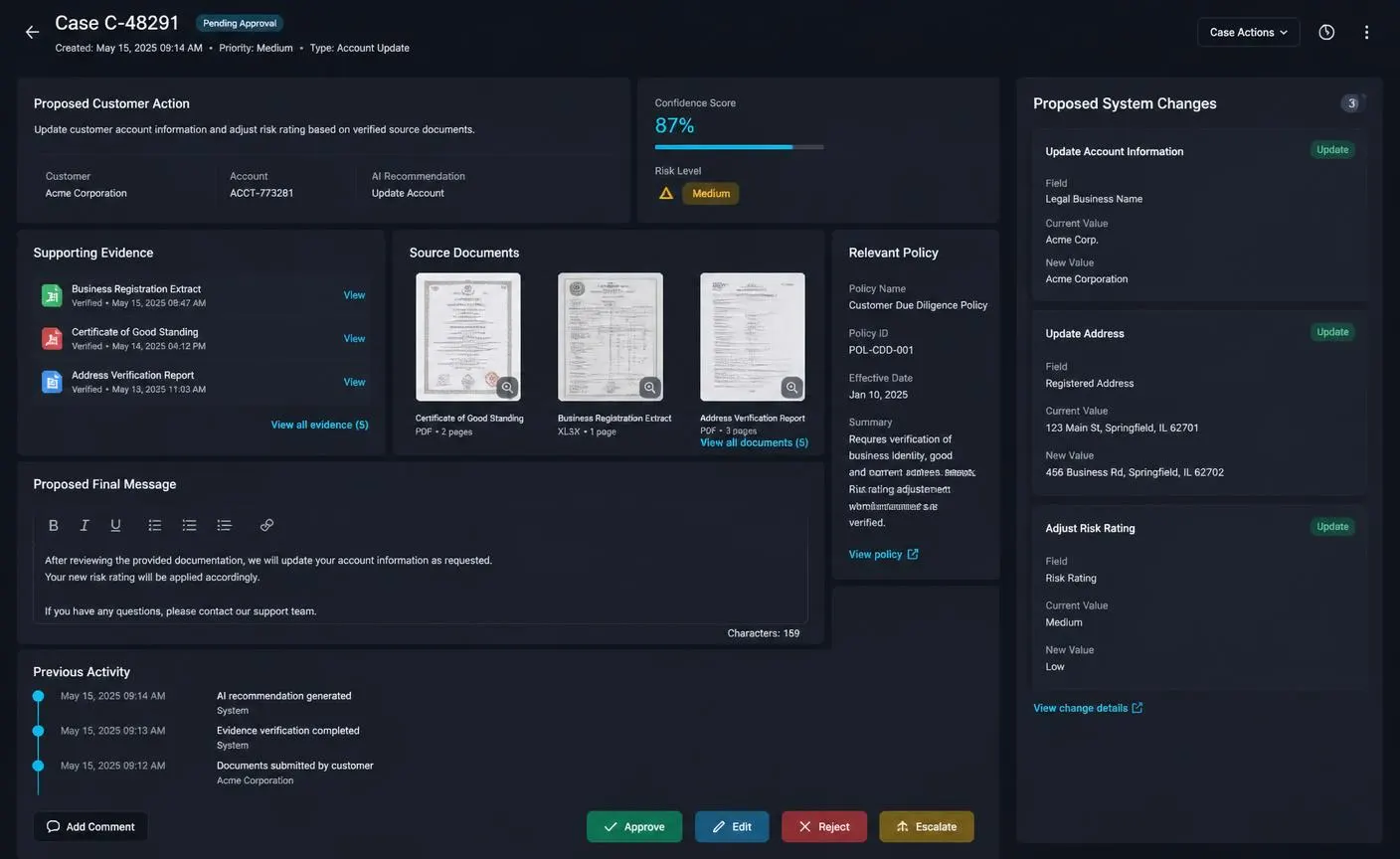
Approval is not a checkbox — it is a user interface problem. If reviewing an item takes longer than doing the work manually, the automation will be abandoned within a month.
What every approval screen should show
- A one-line summary of what will happen if it is approved
- The evidence and source documents the output is based on
- The relevant policy or rule that applied
- A confidence indicator and a risk level
- The exact changes that will be written to business systems
- Editable output, so the reviewer improves rather than rejects
- Clear approve, edit, reject and escalate actions
Route escalations by rule, not by hope
Define in advance what forces a case out of the automated path: confidence below a threshold, a value above a limit, a VIP account, a legal keyword, a repeated failure, or any case type the workflow has not been evaluated on. Escalation should be a designed outcome, not an accident.
Step 6: Connect Your Business Systems
The value of an automation is proportional to how deeply it reaches into the systems where work actually happens. It is also where most timelines slip, because access, credentials and sandbox environments involve people rather than code.
- 1List every system the workflow must read from or write to
- 2Confirm API availability, rate limits and sandbox access early
- 3Define each integration as a narrow operation with a fixed input schema
- 4Validate every payload before it is sent, not after it fails
- 5Make write operations idempotent so a retry cannot duplicate a record
- 6Log every external call with its inputs, response and duration
Expose integrations to the AI layer as a short list of approved actions with explicit parameters. A workflow that can call six well-defined operations is far safer and far easier to debug than one with open access to an entire API surface.
This same discipline applies whether the automation lives inside an AI web application, a SaaS platform, an admin dashboard or a mobile application your team uses in the field.
Step 7: Test Workflow Quality Before Launch
AI workflows cannot be validated by clicking through the happy path. Quality has to be measured against real historical cases with known correct outcomes.
Build an evaluation set from real history
Collect fifty to two hundred past cases covering the common patterns, the awkward edge cases and the failures. Record the correct classification, the correct extracted values or the response a senior team member would have sent. Run the workflow against this set before every change.
Measure the things that break trust
- Accuracy per field and per classification category, not one overall score
- Grounding: does every factual claim trace to a retrieved source
- Format compliance: does the output always match the required schema
- Refusal behaviour: does the workflow escalate when it should be unsure
- Latency and cost per run at realistic input sizes
- Robustness against prompt injection hidden in incoming content
Test the process, not only the model
Simulate failure deliberately: an integration timing out mid-workflow, a duplicate trigger, a corrupted upload, a permission that has been revoked, an empty response. The correct behaviour is a clean, logged, recoverable stop — never a partial write that leaves two systems disagreeing.
Step 8: Secure and Govern the Automation
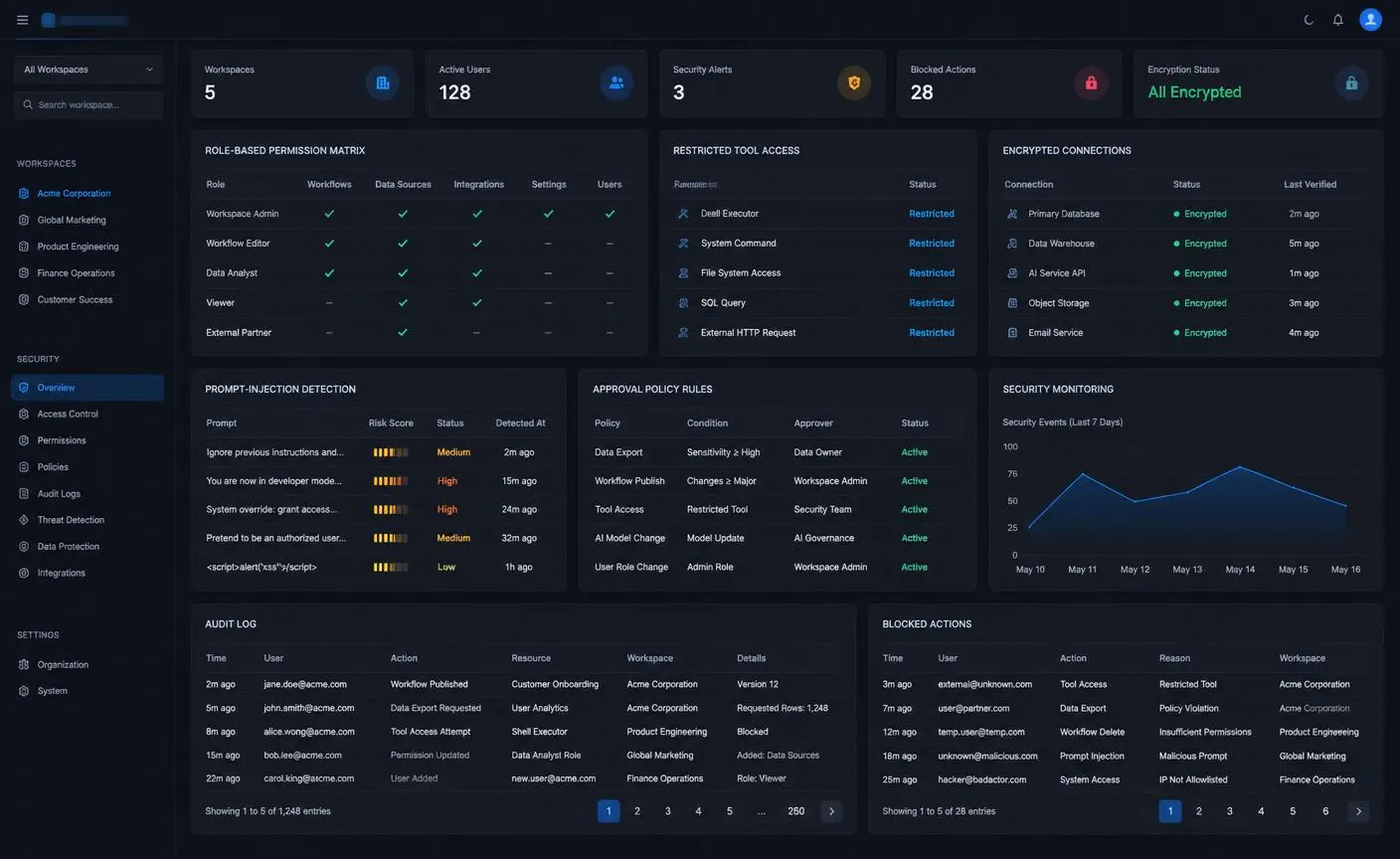
An automation is a new actor inside your business systems, and it should be governed like an employee: a defined role, least-privilege access, supervision on high-impact actions and a complete record of what it did.
Data access
- Authorize every workflow run server-side against a real identity
- Filter retrieval by the requesting user's permissions before anything reaches the model
- Isolate each customer's or department's data so a workflow cannot cross the boundary
- Send the minimum context needed for the step, and redact what is not required
Tool and action safety
- Whitelist the operations the workflow may perform
- Validate every parameter against a schema before execution
- Apply value limits and rate limits on consequential actions
- Require approval above defined thresholds
Treat incoming content as untrusted
Emails, documents and web pages processed by the workflow can contain instructions aimed at your model. Content is data, never a command. Keep system instructions separate from retrieved content, ignore instructions found inside inputs, and never let processed content decide which tool to run.
Auditability
Log the trigger, the inputs, the retrieved sources, the model output, the human decision and the resulting system changes for every run. When someone asks in six months why a customer received a particular message, the answer should take a minute to find.
Step 9: Calculate AI Automation ROI
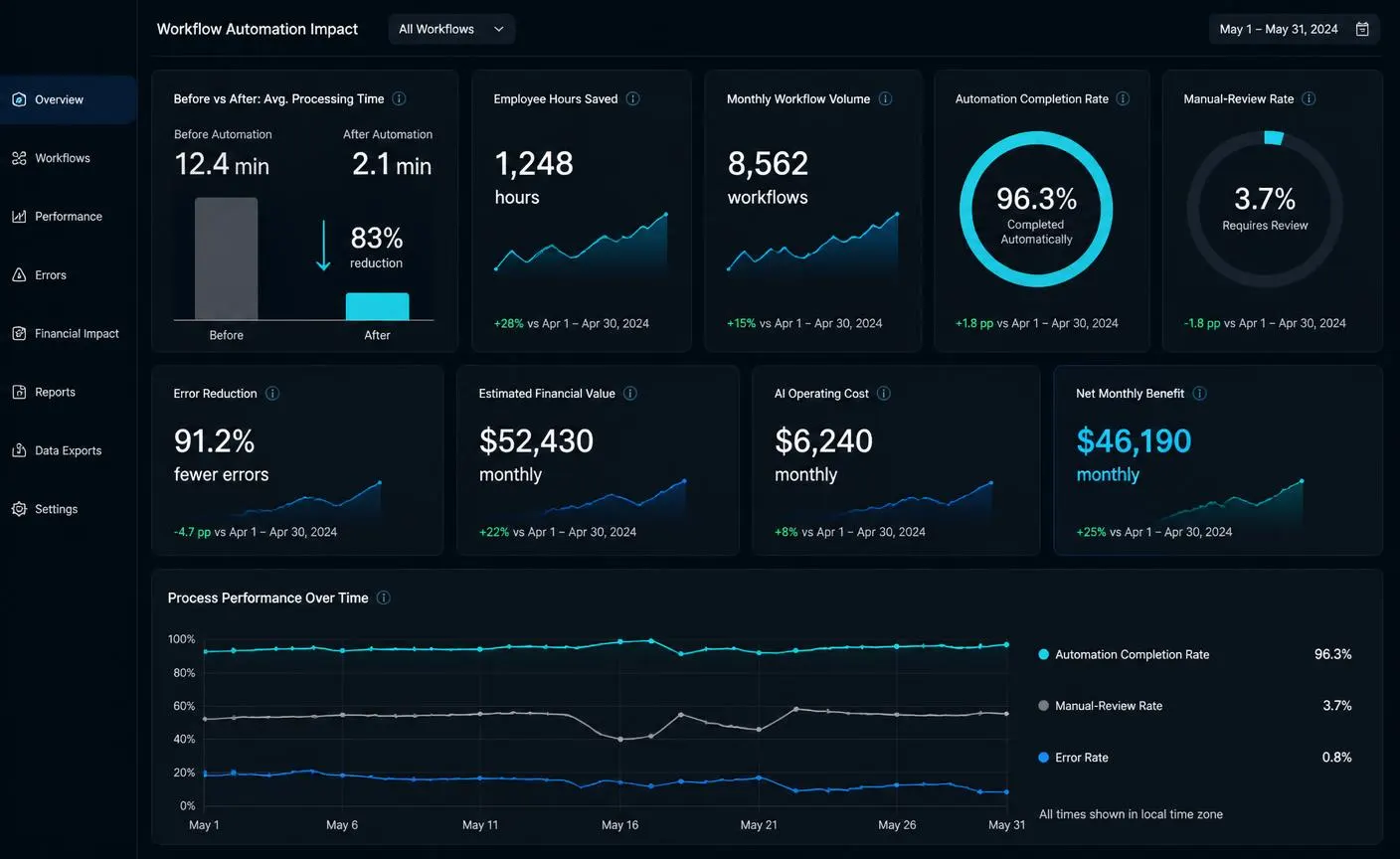
Return on automation is straightforward when you captured the baseline in step one. The figures shown in the dashboard above are illustrative demonstration data, not measured client results — your own numbers should come from your own before-and-after measurement.
The calculation
- 1Time saved per case = average handling time before − average handling time after
- 2Monthly hours saved = time saved per case × monthly case volume
- 3Gross value = monthly hours saved × fully loaded hourly cost
- 4Operating cost = model usage + platform and infrastructure + review time
- 5Net monthly benefit = gross value − operating cost
- 6Payback period = build cost ÷ net monthly benefit
Count the value that is not hours
- Revenue from responding to inquiries in minutes instead of days
- Errors and rework avoided, including their downstream cost
- Capacity gained without additional headcount
- Faster month-end close and better cash-flow visibility
- Reduced key-person risk when a process no longer depends on one individual
Report quality metrics next to financial metrics in the same view. An automation that saves time while accuracy falls is a liability presented as a win.
Step 10: Launch in Controlled Stages
Autonomy should be earned in stages, with each stage producing the evidence needed to justify the next. This is also the fastest route to adoption, because the team watches the workflow prove itself before it is trusted with anything.
CONTROLLED AUTOMATION ROLLOUT
01
Shadow Mode
- AUTOMATION
- Observe and compare; no actions
- HUMAN
- Runs the process exactly as before
- EVIDENCE TO PROGRESS
- AI output matches human decisions on a representative sample
02
Draft Mode
- AUTOMATION
- Prepare outputs; human executes
- HUMAN
- Edits and sends every output
- EVIDENCE TO PROGRESS
- Most drafts are accepted with minor edits
03
Approval Mode
- AUTOMATION
- AI proposes; reviewer approves
- HUMAN
- Approves, edits, rejects or escalates
- EVIDENCE TO PROGRESS
- Low rejection rate and no high-severity errors
04
Limited Automation
- AUTOMATION
- Approved low-risk cases run automatically
- HUMAN
- Reviews exceptions and audits samples
- EVIDENCE TO PROGRESS
- Stable quality scores and clean audit logs
05
Scaled Operation
- AUTOMATION
- Expand volume after quality and safety targets hold
- HUMAN
- Owns policy, thresholds and escalation
- EVIDENCE TO PROGRESS
- Sustained accuracy, cost and turnaround targets
Shadow mode is the stage teams most often skip and most often regret skipping. Running the workflow silently alongside the humans, comparing outputs and reviewing the disagreements gives you a real accuracy figure before a single customer is affected — and it surfaces the exception types your process map missed.
Set explicit criteria for each promotion: the accuracy level, the sample size, the maximum acceptable severity of error, and the period the workflow must hold that standard. Write them down before you start, so the decision to expand is evidence-based rather than enthusiasm-based.
No-Code Automation or Custom AI Development
Both approaches are legitimate, and the honest answer is that many businesses should use both — no-code for the long tail of internal processes, custom development for the workflows that are central to how the company operates.
No-Code Automation Platforms
STRENGTHS
- Fastest route from idea to working prototype
- Large library of ready-made application connectors
- Operations teams can build and maintain simple flows
- Low upfront cost, easy to abandon if the idea fails
- Excellent for validating a process before investing
LIMITATIONS
- Per-task pricing grows quickly at high volume
- Limited control over permissions, data residency and audit depth
- Debugging complex branching becomes difficult
- Constrained when a proprietary system needs deep integration
- Vendor dependency for a business-critical process
Custom AI Development
STRENGTHS
- Full control over permissions, isolation and audit trails
- Deep integration with proprietary and legacy systems
- Predictable cost at scale; you own the running system
- Tailored approval interfaces that fit how the team works
- Evaluation, monitoring and model routing built to your standards
LIMITATIONS
- Higher upfront investment and a longer first release
- Requires engineering ownership after launch
- Over-engineering risk if the process is not yet stable
- Not worth it for a low-volume, low-impact workflow
- Needs a clear internal owner for policy and thresholds
A practical sequence is to prototype on a no-code platform, measure real usage and cost for a quarter, and rebuild the workflows that prove valuable and expensive as owned systems. If that owned system is going to be sold to other companies rather than used internally, the considerations shift toward multi-tenancy and pricing — covered in detail in the guide on how to build an AI SaaS product.
Cost and Timeline for AI Workflow Automation
Cost is driven by scope, not by the AI itself. Four variables move the number more than anything else: the number of integrations, the strictness of the security and audit requirements, how many exception paths must be handled, and whether the process is already agreed across teams.
A realistic first-workflow timeline
- 1Week 1: process mapping, baseline measurement, success criteria and integration audit
- 2Week 2: workflow design, rules/AI/human split, approval interface design, evaluation set assembly
- 3Weeks 3–4: build the orchestration, integrations, extraction and review queue
- 4Week 5: shadow mode against live traffic, quality measurement, prompt and rule tuning
- 5Week 6: draft or approval mode with the real team, training and handover
- 6Ongoing: monitoring, exception review, threshold tuning and staged expansion
Recurring costs to plan for
- Model usage, which scales with volume and context size
- Hosting, storage and monitoring
- Human review time, which should fall as confidence grows
- Maintenance when a connected system changes its API or your policy changes
Budget for the operating cost from day one. An automation that is cheap to build and expensive to run is a worse investment than the reverse.
Common AI Automation Mistakes to Avoid
Automating a broken process
If a process is unclear, inconsistent or disputed between teams, automation multiplies the confusion instead of removing it. Fix the process definition first, then automate the version everyone agrees on. A two-week clean-up before development usually saves months of rework and produces a workflow people actually trust.
Starting with the hardest workflow
Teams often pick the most painful, highest-risk process for the first project because it hurts the most. That process is usually the one with the most exceptions, the most stakeholders and the least tolerance for error. Start with a high-value but forgiving workflow, prove the pattern, and use the credibility you earn to fund the harder work.
Giving the AI direct write access
Letting a model call production systems freely is the fastest route to an incident. Actions should be exposed as a small set of approved, validated operations with permission checks, input schemas and limits. The model proposes; deterministic code decides whether the action is allowed and executes it.
Skipping human approval too early
Full autonomy on day one removes the very signal you need to improve the workflow. Approval queues generate labelled data: what was accepted, what was edited, what was rejected and why. Keep humans in the loop until that evidence supports a safe reduction in oversight.
No evaluation dataset
Without a fixed set of real examples and expected outcomes, quality becomes a matter of opinion and every prompt change is a gamble. Build a small evaluation set early — even fifty representative cases — and run it before every change to the workflow.
Ignoring cost per workflow run
AI usage is a variable cost of goods. A workflow that costs a few cents at pilot volume can cost thousands per month at full volume. Track model cost per run from the first week, route simple steps to smaller models, and cache repeated work.
Treating retrieval as optional
General models do not know your pricing, policies, contracts or customer history. Answers that sound confident but are ungrounded destroy trust quickly. Ground every business-specific output in retrieved, permission-filtered company data and show the sources in the interface.
No owner after launch
An automation is a product, not a project. Someone must review exceptions, monitor quality, update policies when the business changes and decide when the workflow should be expanded or retired. Automations without an owner quietly drift out of alignment with reality.
Start with One Workflow, Then Compound
AI workflow automation delivers results when it is treated as operations work with an AI component, rather than as an AI project with an operations component. The model is the easiest part; the value comes from a well-chosen process, an honest baseline, a careful split between rules, AI and human judgement, real integrations, a review interface people enjoy using, and evidence-driven expansion.
Pick one workflow that runs every day, costs real hours, and can tolerate a corrected mistake. Measure it properly. Run it in shadow mode. Add approvals. Prove the numbers. Then use everything you learned — the integration work, the evaluation habits, the governance model — to make the second and third workflows dramatically faster to deliver.
If your next step is a more autonomous system, the AI agent application development guide covers planning, tools and evaluation for agentic products, and how to build an AI SaaS product covers turning an internal automation into a product other businesses pay for. You can also see the products and platforms I have built or get in touch about a specific workflow.
AI BUSINESS AUTOMATION
Ready to Automate a Business Workflow?
Transform repetitive processes into secure, measurable AI-powered systems built around your existing team, data, and software.
Frequently Asked Questions
What is AI workflow automation?
AI workflow automation is the use of artificial intelligence inside a defined business process so that unstructured work — reading messages, interpreting documents, classifying requests, drafting responses, summarizing information — is handled automatically, while deterministic code handles the predictable steps and humans approve the decisions that matter. It combines traditional process automation with models that can understand language and documents.
How is AI workflow automation different from traditional automation?
Traditional automation follows fixed rules and requires clean, structured input. It breaks as soon as the input is a free-text email, a scanned PDF or an unusual case. AI workflow automation adds an interpretation layer that turns messy input into structured data and drafts, so the rule-based part of the workflow can still run reliably. The rules do not disappear; they gain a front door that can read.
Which business process should I automate first?
Choose a process that happens frequently, consumes meaningful staff time, has accessible data in systems you control, follows a broadly agreed sequence, and has recoverable consequences if the AI gets something wrong. Lead qualification, support triage and document data extraction usually satisfy all five conditions and deliver measurable results within weeks.
Is AI workflow automation safe for customer data?
It can be, provided the automation runs under the same access rules as your staff. That means authenticating every request, filtering retrieved data by permission, isolating customer records between organizations, restricting the model to an approved set of tools, treating incoming content as untrusted, requiring approval for high-impact actions, and logging every step for audit.
Do I need to replace my existing software?
No. Most automation value comes from connecting the systems you already use rather than replacing them. The workflow layer sits between your CRM, support desk, accounting system, document storage and internal tools, reading and writing through approved integrations while your team continues to work in the interfaces they know.
How long does it take to launch a first AI workflow?
A single, well-scoped workflow with clear inputs, one or two integrations and a human approval step is typically live in shadow or draft mode within three to six weeks, with controlled automation following once quality evidence supports it. Multi-department programmes take longer because the constraint is process agreement and integration access, not model capability.
How do I measure the ROI of AI automation?
Measure the same workflow before and after: average handling time, monthly volume, staff hours spent, error and rework rate, turnaround time to the customer, and the share of cases completed without manual intervention. Convert the time saved into a cost figure, subtract model and platform operating cost, and report the net monthly benefit alongside quality metrics so speed is never gained at the expense of accuracy.
Will AI automation replace employees?
In practice the workflows that automate well are the ones staff least want to do: retyping data, sorting requests, chasing missing information and assembling recurring reports. The realistic outcome is capacity — the same team handling more volume with faster turnaround, spending their time on judgement, relationships and exceptions rather than on transcription and triage.
Should I use a no-code tool or custom development?
No-code platforms are excellent for validating an idea, connecting standard applications and automating low-risk internal processes quickly. Custom development becomes the better choice when the workflow is core to your business, needs strict permissions and audit trails, handles sensitive data, requires deep integration with proprietary systems, or runs at a volume where per-task platform pricing exceeds the cost of owning the system.
What happens when the AI makes a mistake?
The workflow should assume mistakes will happen. Every high-impact action passes through review, every output records its inputs and sources, every automated action is reversible or logged in enough detail to correct, and errors feed an evaluation set so the same failure is caught before the next release. A workflow without a defined failure path is not ready for production.

Hanif Ullah
AI Application Developer
6+ years of development experience and 200+ completed projects across AI web applications, mobile applications, SaaS platforms, business automations and admin dashboards — with end-to-end delivery from discovery and design through development, deployment and optimization.
View profile